




Golden CCCAM Subscription & Renewal
A Golden CCCAM subscription is built for satellite receivers that support the CCcam protocol. Instead of streaming the whole TV picture over IPTV, the receiver uses its satellite signal while the sharing server supplies the required access data over the internet. That makes receiver compatibility, satellite signal quality and the exact package list more important than a headline channel count.
If your receiver is designed for a different sharing system, compare it first with an Apollo IKS subscription so you do not buy a server your hardware cannot use.
To buy or renew: send Store SAT your receiver model, the satellites or packages you need, and whether you are activating a new line or renewing an existing one. Confirm the current price and duration before payment.
Check the Golden CCCAM price context before you buy
The current Store SAT English product page does not publish a fixed Golden CCcam price in the visible copy. Competitor pricing is useful only as a market reference, not as a Store SAT price.
| Option | Store SAT price | Market reference | Confirm before payment |
|---|---|---|---|
| Monthly-style CCcam plan | Confirmed at purchase | One competitor advertises a Gold tier at €10/month | Duration and server type |
| Premium CCcam plan | Confirmed at purchase | Another competitor advertises paid CCcam tiers from €6/month | Supported packages |
| Renewal | Confirmed at purchase | Varies by provider | Whether account details stay the same |
Those figures belong to other sellers and should not be treated as Store SAT pricing. If your receiver uses another IKS system, compare the Funcam IKS subscription before you commit.
Make sure your receiver can actually use CCcam
| Receiver type | Typical status | What you need |
|---|---|---|
| HD receiver with CCcam client | Usually compatible | Internet + Host + Port + User + Password |
| Geant 750 4K | Store SAT shows a real CCcam settings example | Server Settings menu and CCcam option |
| Receiver with no CCcam menu | Needs verification | Compatible firmware or a different server type |
Hardware families can support different sharing protocols even when they look similar. If your model is built around Gshare instead, check the Gshare IKS subscription rather than forcing a CCcam setup onto the wrong receiver.
Confirm the satellite packages you need, not just the satellite name
The existing product details also list Astra 4E and Astra 28E among supported satellite positions, alongside the other European and regional satellites already covered here. Confirm the exact package you need before purchase because channel availability can vary by provider and transponder.
The current Store SAT page lists a broad range of eastern and western satellites associated with sharing, including Astra 19E, Astra 23E, Hot Bird 13E, Eutelsat 16E, Türksat 42E, Hellas Sat 39E, Thor 1W, Amos 4W, Nilesat 7W and Hispasat 30W.
- European sports and entertainment packages may be available on supported satellites.
- Arabic and regional packages can vary as providers change encryption and access conditions.
- A satellite appearing on the compatibility list does not guarantee every encrypted package on it.
- Your dish alignment and signal strength still matter because the video comes from the satellite receiver.
If you want another sharing-oriented option to compare package coverage, the Apollo VIP Sharing subscription gives you a separate commercial path to evaluate.
Enter Golden CCCAM server data without breaking the setup
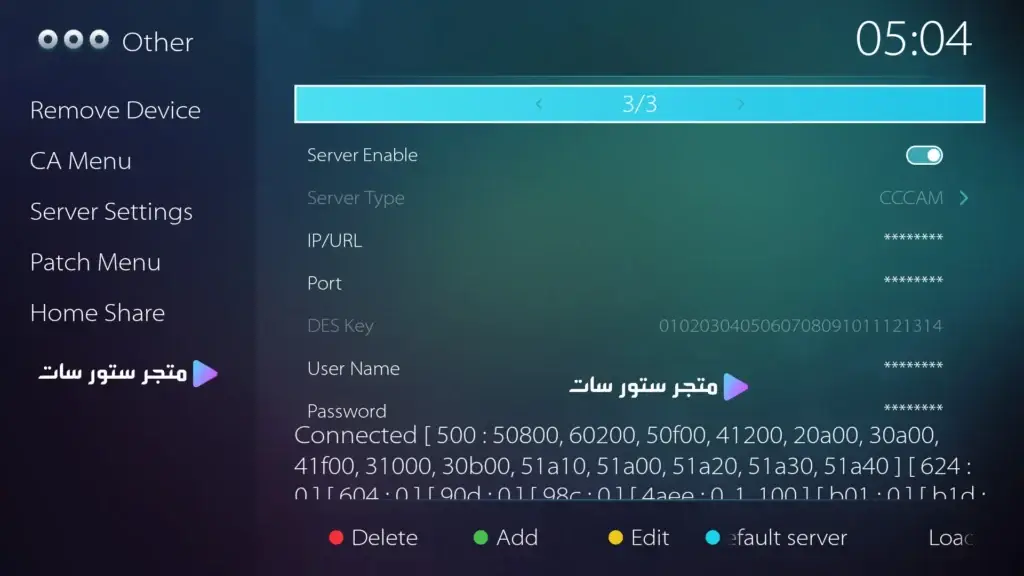
CCcam settings example shown on a Geant 750 4K receiver.
- Connect the receiver to the internet and verify the connection first.
- Open the receiver’s Server Settings menu.
- Select CCcam as the server protocol.
- Enter the Host or IP exactly as supplied.
- Enter the Port number supplied with your own subscription.
- Enter the User and Password exactly, including character case.
- Save the line and enable the server connection.
- Test several channels on the satellite package you actually use.
Do not copy a fixed port number from an old tutorial. The correct Port is part of your own account details and can differ between servers.
Renew Golden CCCAM without losing a working configuration
If your current line still exists in the receiver, ask Store SAT whether the same Host, Port, User and Password will remain active after renewal. Do not erase a working configuration until you know whether the renewal keeps the same account data.
- Confirm the renewal duration.
- Keep a copy of the existing server line before changing anything.
- Ask whether the server credentials will remain unchanged.
- After renewal, test the specific packages you normally watch.
Fix the most common CCcam problems before blaming the server
| Problem | Likely cause | First check |
|---|---|---|
| Server will not connect | Incorrect Host, Port, User or Password | Re-enter the credentials exactly |
| Only some channels open | Package support changed | Confirm the current package list |
| Freezing or slow zapping | Weak satellite signal or unstable network | Test signal quality and internet |
| No CCcam option | Receiver or firmware does not support it | Verify the receiver software |
If CCcam is not the right match for your receiver, compare the Nashare subscription before buying another line.
Golden CCCAM subscription FAQ
What details do I receive with a Golden CCcam account?
A typical CCcam line includes a Host or IP, Port, User and Password. Enter each value exactly in the receiver’s CCcam server settings.
Does Golden CCcam work on every satellite receiver?
No. The receiver must support CCcam or compatible client software. Send your exact model to Store SAT before payment.
Does it open every encrypted channel on every listed satellite?
No service should promise that. Package availability changes and depends on the server source, satellite and current encryption conditions.
Does CCcam need fast internet?
CCcam generally uses far less data than full IPTV video streaming, but the receiver still needs a stable internet connection to communicate with the server.
How do I tell whether a problem is the server or my dish signal?
First test a free-to-air channel on the same satellite. If the satellite signal is good but the CCcam line shows disconnected, recheck the network and server credentials.
Are there English customer reviews for this product?
The English product page currently shows no English-language reviews, although WordPress offers a link to reviews from other languages. We do not fabricate translated customer quotes.
Choose the sharing server that matches your hardware
Before buying or renewing a Golden CCCAM subscription, confirm the receiver model, the satellites and packages you need, the current Store SAT price, the duration and the exact account format.
For Enigma-based hardware, compare the Powercam Enigma subscription before placing the final order.
Ready to activate? Send your receiver model and target packages to Store SAT, confirm the current terms, then use the purchase or WhatsApp option on this product page.


Reviews
There are no reviews yet.