





Hot Player Activation for Roku, LG, Samsung and Android TV
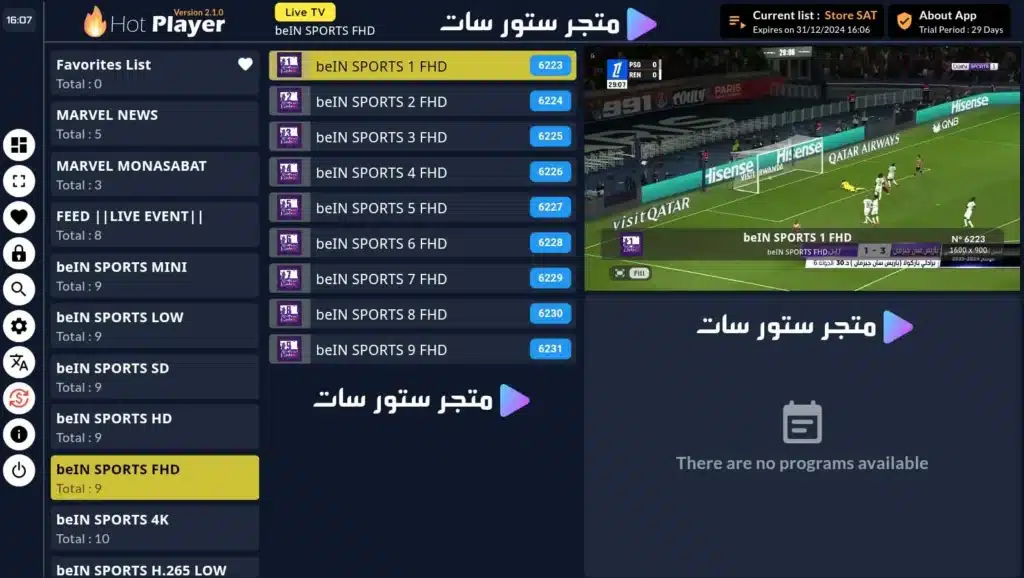
Hot Player activation is a player-license product, not an IPTV channel subscription. The current Store SAT page describes HotPlayer as an app that loads and organizes IPTV playlists on supported devices. You still need a separate IPTV subscription or playlist to provide the channels and VOD.
If you are comparing another player first, review the BOB Player IPTV Subscription Activation.

Know what you are buying: player activation, not channels
| Item | Hot Player provides | Hot Player does not provide by itself |
|---|---|---|
| App access | Player interface and playlist tools | A channel package |
| Playlists | Up to 3 playlist slots | IPTV credentials automatically |
| Security | MAC lock and parental PIN | Internet service |
| Price | Not fixed numerically in current copy | No price should be assumed |
For another player option, compare Flixtra Player Subscription Activation.
Features already documented on the current HotPlayer page
- Alphabetical channel sorting from A-Z or Z-A.
- MAC lock to reduce unauthorized playlist resets.
- Up to three playlists with easy switching.
- Favorites list for frequently watched channels.
- Remote-control channel-number navigation.
- Search for channels, movies and series by keyword.
- Parental control with a PIN to hide or lock content.
If you prefer a different player ecosystem, review IBO Player Subscription Activation.
Supported stores and devices on the live page
The current product page lists the Roku TV Store, LG TV Store, Samsung TV Store and Google Play / Android TV. That makes device compatibility easy to check before paying: search for HotPlayer on the exact device store first.
- Roku TV.
- LG Smart TV.
- Samsung Smart TV.
- Android TV and compatible Android devices.
- Other supported Smart TV environments where the app is available.
For another common player route, compare IPTV Smarters Player Subscription Activation.
Activation should begin with the exact device
- Open the device app store and confirm HotPlayer is available.
- Install the app before purchasing activation.
- Open HotPlayer and note the device identifiers or activation information it displays.
- Confirm the current activation price and term with Store SAT.
- Complete payment and provide the required device details.
- After activation, add your own IPTV playlist or subscription credentials.
Do not confuse player activation with the IPTV subscription itself
HotPlayer can organize and play playlists, but the channel source comes from a separate IPTV service. If you still need the actual service rather than only the player, review an iptv subscription before activating the app.
For another player alternative, compare Rivolut Player IPTV Subscription Activation.
Hot Player review status
The current English Hot Player page has no written customer reviews, so this page does not invent ratings, replacement guarantees, license duration or numeric pricing that the live copy does not prove.
Hot Player activation FAQs
Does Hot Player include IPTV channels?
No. It is a player. You need a separate IPTV playlist or subscription for channels and VOD.
Which devices currently list HotPlayer?
The live page names Roku TV, LG TV, Samsung TV and Android TV / Google Play.
How many playlists can HotPlayer store?
The current page states that it can load up to three playlists.
Does HotPlayer have parental controls?
Yes. The page describes PIN-based locking or hiding of content.
What is the current Hot Player activation price?
A fixed numeric price is not shown in the current page copy, so confirm the price and activation term before payment.
Activate the player only after confirming it exists on your device
The safest HotPlayer purchase is to install the app first, confirm the device is supported, then buy activation. This avoids paying for a player that your TV or streaming device cannot install.
Reviews
There are no reviews yet.